

.png)
Key takeaways
- Simplify what you track. Focus on the donor data your team actually uses to guide outreach and follow-up—cut fields that don’t drive decisions.
- Build shared CRM habits across your team. Clear expectations, ownership, and simple cleanup routines keep your data usable and your outreach consistent.
- Track engagement, not just donations. Event attendance, email activity, volunteer shifts, and recurring gift upgrades reveal who’s most invested in your mission.
- Know when the tool—not your team—is the issue. If your CRM requires constant workarounds or manual exports, it may be time to switch to a system built for nonprofit workflows.
What is a nonprofit CRM?
A nonprofit CRM is a system that helps you manage relationships with donors, volunteers, members, and supporters. Its most basic function is to store contact information, but strong non-profit CRMs help you understand:
- Who your supporters are
- How they engage with your mission
- When to communicate with them
Otherwise, you could get by with just a spreadsheet. The other option is a CRM that’s built for sales teams at profit-driven companies, but those are a mismatch to your mission and will take too much effort to adapt to nonprofit workflows.
💡 A nonprofit CRM should do more than store records
Your CRM should not be a digital filing cabinet. Instead, it should help you build stronger relationships with your supporters. It should make it easier to follow up with first-time donors, re-engage lapsed supporters, thank volunteers, and personalize outreach to major givers.
If your CRM only stores information but doesn’t help you act on it, it may be time to look for one that does.
How to get more value from any nonprofit CRM you use
Having a CRM doesn’t automatically improve fundraising. It has to be used effectively. Here are some tips to help you make the most of your nonprofit CRM.
1. Simplify what you track
When you try to track everything in your CRM, the system gets messy, and you end up tracking nothing well.
To get more value from your nonprofit CRM, pick a small set of fields and actions your team will use every time. Keep the list short enough that someone can update a record in under two minutes.
Start with what actually drives decisions and follow-up, like:
- Who the person is: Name, email, phone, and preferred contact method
- How they support you: Donor, volunteer, attendee, member, or partner
- What matters for outreach: Giving frequency, last gift date, and any key notes that affect how you should approach them
Then cut the rest. If a field doesn’t change how you talk to someone or what you do next, it doesn’t belong in your “must update” list.
You can still keep extra fields for edge cases, but don’t make them required.
2. Treat your CRM as a daily tool
Your CRM shouldn’t be a place you visit only when you need a report. Instead, aim to use it daily. If that’s too much, set a weekly usage routine. This helps your team adopt the tool better, keep information accurate, and build donor relationships more easily.
You can regularly use your CRM to:
Log donor conversations
You should log every call, meeting, and reply from donors in your CRM. A short note is enough: What did they care about? What did they ask for/about? What did you promise to send?
Note: Your CRM should ideally allow you to automate parts of this, like pulling in form submissions, automatically recording donations, and logging email replies when possible. This keeps your records complete without straining back-office teams.
Review recent engagement
Get in the habit of checking what happened in the last few days. Who donated? Who signed up for an event? Who stopped giving? This helps you notice patterns early, so you can follow up at the right time.
Plan follow-ups
Use your CRM to create simple follow-up lists, e.g., first-time donors to welcome, recurring donors to thank, event attendees to re-engage, or lapsed supporters to check in with. Set clear next steps and, if possible, set reminders inside the system so nothing slips through the cracks.
3. Track donor engagement
Donations tell you what happened, but they don’t tell you why it happened or what should happen next. Instead of focusing only on gift amounts, also track donor/supporter engagement.
Some key engagement signals to track include:
- Event attendance: Track who registers and who attends. If someone keeps showing up, it means they care about your mission even if their donations are small.
- Email engagement: Look at who opens and clicks your emails. A supporter who reads your updates regularly is paying attention and may respond well to a more direct or personal ask.
- Volunteer activity: Record volunteer roles and hours. Volunteers are already invested in your work. With the right follow-up, many may become long-term donors.
- Peer-to-peer fundraising activity: If someone shares your campaign or creates their own fundraising page, that shows a strong belief in your cause. These supporters often make great advocates and repeat donors.
- Recurring gift sign-ups or upgrades: When someone moves from a one-time gift to a monthly gift, that signals trust. And if they increase their recurring amount, it shows a growing confidence in your work.
When this information lives in your nonprofit CRM, segmentation becomes easier and more accurate. Instead of sending the same message to everyone, you can tailor outreach based on behavior, which increases the likelihood of a response.
4. Create shared expectations for your team
Instead of leaving your team to figure out the CRM on their own, create a clear system for how it should be used. It doesn’t need to be long or complicated. A few simple, shared rules are enough.
For example:
- Every donor conversation gets logged within 24 hours.
- Every gift is acknowledged and marked in the system.
- Required fields are updated before closing a task.
- Follow-ups are created inside the CRM, not in personal notebooks.
Keep the rules short and realistic. If expectations are too complex, people will struggle (or ignore them entirely).
It also helps to assign ownership. Decide who is responsible for data quality, who reviews engagement weekly, and who runs key reports. When everyone knows their role, the CRM no longer feels like extra work but becomes part of the workflow.
5. Use your CRM to inform decisions
When your data is up to date in your CRM, you can use it to make smarter choices in three key areas:
Which donors to prioritize
Use your CRM to identify donors who give consistently, have recently increased their gifts, attend events, or actively engage with your emails. These signals show their commitment to your mission.
You can also identify at-risk donors, such as people who used to give regularly but have not donated this year. Instead of treating every contact the same, your CRM helps you focus on where your outreach will matter most.
When to ask for support
Timing matters. If someone just attended an event or clicked through your last three emails, they are engaged right now, and this may be a good moment to invite them to give or get involved. On the other hand, if someone has not opened an email in six months, you may need to reconnect before making another ask.
How to tailor messaging
Not every supporter should receive the same message. First-time donors, for example, may need reassurance about how their gift made a difference. Recurring donors may appreciate updates that show long-term progress, and volunteers may respond better to impact stories tied to the programs they serve.
6. Clean up data regularly, but realistically
Some nonprofit teams treat data cleanup as a once-a-year project. They block off a day, try to fix everything, and then avoid it for another 12 months. This rarely works because small errors accumulate over time, and a single cleanup session cannot fully correct months of inconsistent data.
A better approach is to build small cleanup habits into your normal workflow. For example:
- Review and merge duplicates once a month.
- Check incomplete records every week, maybe on Fridays.
- Fix errors as soon as you notice them.
Small, steady cleanups prevent your system from becoming messy and overwhelming.
Note: Ideally, your nonprofit CRM should help with this. It should automatically flag or merge duplicate records and sync donations and contact updates without manual imports. This saves back-office teams time and keeps your data clean without increasing headcount.
How to know your CRM is the problem, not how you use it
Sometimes the issue isn’t poor adoption or messy processes—it’s that the system itself wasn’t built for the way your organization works.
Your team could be doing everything right and still struggling to get value from the CRM.
Here are some signs it's your CRM that’s the issue:
Routine tasks require workarounds or spreadsheets
If your team exports data just to segment a list, tracks follow-ups in Google Sheets, or keeps side documents to manage campaigns, your CRM is not supporting your workflow.
These workarounds may seem benign at first, but over time, they create extra admin work and increase the risk of errors.
There is ongoing training, but adoption stays low
If you keep running training sessions but your team still avoids using the system, the problem may not be your team.
A tool that fits your workflow should feel intuitive once you've mastered the basics. If it feels confusing, people will quietly return to using email threads and personal notes to track donor information.
It’s built for sales teams, not nonprofits
If the language, structure, and reporting focus on deals and pipelines rather than donors, campaigns, and recurring gifts, your team will always feel as if they are forcing the system to work. A good nonprofit CRM should adapt to your workflows, not force you into rigid processes
Reporting takes too much effort
If pulling a simple fundraising report requires custom fields, manual exports, or outside tools, the system is adding friction to your workflow. You should be able to see donor information, donation totals, campaign performance, and engagement trends without having to build a report from scratch every time.
You need a specialist just to keep it usable
If your CRM requires a dedicated admin to manage integrations, clean up data, and configure basic workflows, it may be more complex than your organization needs. Small to midsize nonprofits should not have to increase headcount just to keep their CRM functional.
4 best CRMs for nonprofits and charities to consider
If your current CRM makes it hard to follow best practices or get value from your data, it may be time to rethink the system itself. Here are four CRMs designed specifically to help nonprofits manage donors, supporters, campaigns, and relationships in one place.
1. Givebutter
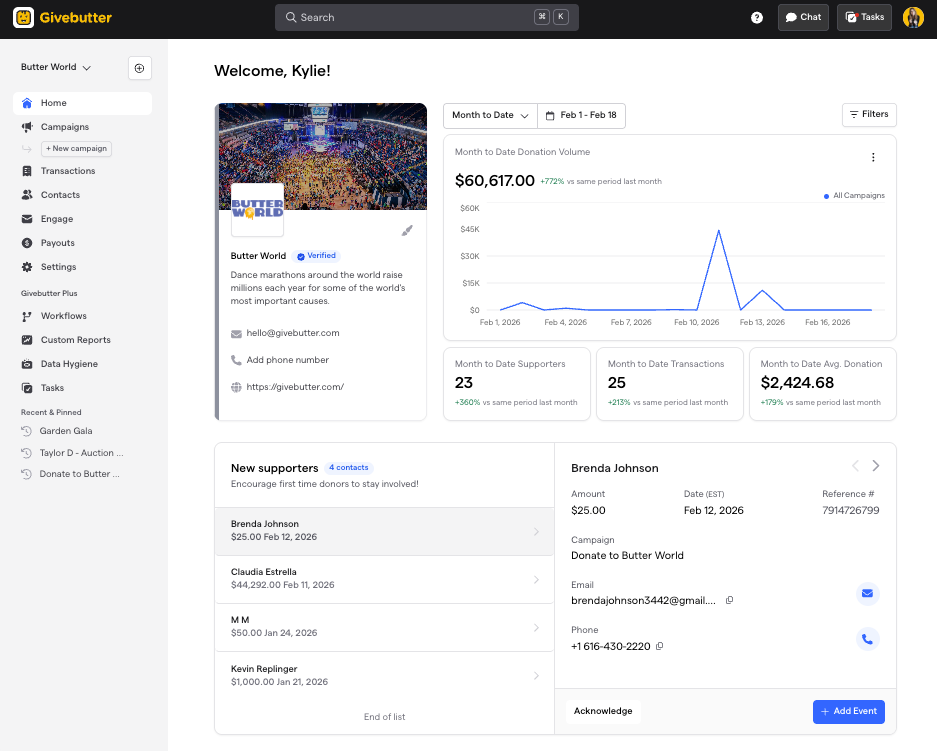
Givebutter is one of the best nonprofit CRMs on the market today. Not only is it free, but it keeps all supporter information, giving history, and engagement activity in one place.
Every donation, event registration, pledge, and message connects directly to an individual or household profile. And each profile includes contact details and shows how the supporter has engaged with your organization over time.
Because Givebutter supports fundraising end-to-end, you can say goodbye to managing spreadsheets, importing reports, or piecing together multiple tools. All activity flows into the CRM from the rest of the platform.
Key features of Givebutter CRM
- Detailed contact profiles: Each supporter profile includes a visual timeline that shows their full journey with your organization, including total giving, recurring donations, past event participation, communication preferences, and personal details to support outreach.
- Household and company management: You can group contacts into households or link them to companies. This helps you track family giving, employer matching programs, or corporate sponsorships while still maintaining accurate individual records.
- Unlimited contacts: Givebutter's nonprofit CRM lets you store and manage as many contacts as you need—no caps, no tiers, no surprise limits as your donor base grows.
- Automatic activity tracking: Contact timelines update automatically with key actions, including donations, ticket purchases, pledges, and outgoing messages. This means your team doesn’t need to manually log every interaction.
- Soft credit tracking: Assign soft credits to recognize donors who influenced or facilitated a gift—like a board member who brought in a major donor—so your records reflect the full picture of who's driving support.
- Custom filters and segmentation: You can filter donor lists based on donation amount, last gift date, recurring status, campaign activity, and more. This makes it easy to segment donors for targeted outreach or reporting.
- Giving summary charts: Each profile displays clear giving summaries, including totals for this year, last year, and all time, which helps you quickly generate year-end giving reports without building complex spreadsheets.
- Pledge and sponsorship tracking: You can log and accept pledges, matching gifts, and sponsorship commitments with secure payment portal links and custom installment schedules.
Pricing
Givebutter’s core fundraising and CRM tools are free with optional donor tips enabled. If they are enabled, but your donors decide not to tip, you’re covered by the Givebutter Guarantee.
Without donor tips enabled, Givebutter charges a flat 3% platform fee on donations processed through the platform, plus standard payment processing fees.
For nonprofits that need more advanced reporting, automation, or additional controls, Givebutter Plus is available.
💡 More than a CRM
Givebutter is a full donor management and fundraising platform. You can use Givebutter to:
- Create donation forms
- Run fundraising campaigns
- Manage events and auctions
- Grow your email list
- Send messages to donors/supporters via email or direct mail
The platform supports many payment methods, including PayPal, Stripe, Apple Pay, Google Pay, Cash App, credit and debit cards, ACH transfers, and checks, giving donors flexibility in how they give.
All donations are deposited in a digital wallet where you can earn APY rewards on your balance, with no minimum balance, monthly fees, or transfer fees. Funds held in the Wallet are eligible for FDIC pass-through insurance up to $250,000 for added protection.
2. Raiser's Edge NXT (Blackbaud)
Raiser's Edge NXT is a cloud-based donor management and fundraising platform built by Blackbaud, designed primarily for mid-size to large nonprofits, higher education institutions, and healthcare organizations.
It combines AI-powered prospect identification, multichannel outreach tools, and deep reporting capabilities, all built around a robust CRM.
It's designed for teams that need enterprise-grade data management, though that depth comes with a steeper learning curve and a price point to match.
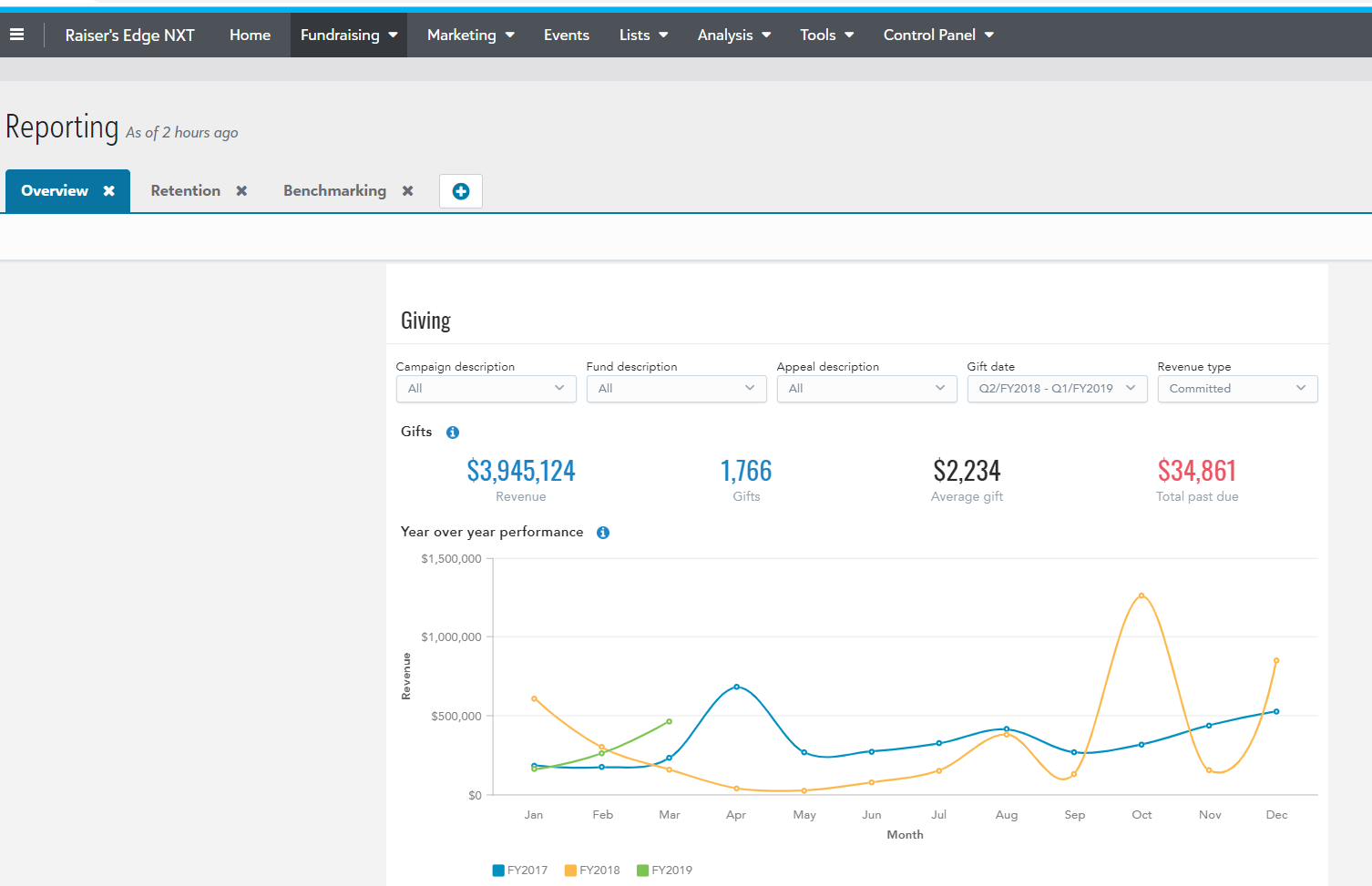
Key features of Raiser's Edge NXT
- AI-powered prospect identification: Automatic AI screenings surface major gift prospects and offers custom analytics tailored to each organization's targeting needs.
- Comprehensive donor records & relationship tracking: The platform stores detailed constituent profiles, interaction logs, and relationship maps, giving fundraisers a full view of each supporter's history and engagement across staff members.
- SKY Reporting & dashboards: With SKY Reporting, users can assess overall organizational performance, visualize the effectiveness of actions, campaigns, and appeals, and access pre-built dashboards for quick insights.
- Multichannel fundraising tools: The platform supports multi-channel fundraising approaches, from mass engagement campaigns to high-touch major giving, with best-practice email templates and automated data health tools to keep donor records current.
- Pledge & recurring gift management: Teams can track pledges, installment schedules, and sustaining donors to manage cash flow and stay on top of long-term commitments.
- Microsoft & third-party integrations: Raiser's Edge NXT integrates with Microsoft Outlook and Office 365, and connects with marketing, events, and alumni outreach tools to centralize donor data across an organization's tech stack.
Pricing
Raiser's Edge NXT uses custom, quote-based pricing tailored to each organization's size, modules, number of users, and support needs—there's no publicly listed flat rate. Reviewers consistently note that the cost can be a significant barrier, particularly for smaller nonprofits, making it a platform most commonly adopted by larger organizations with dedicated development teams and larger budgets.
3. DonorPerfect
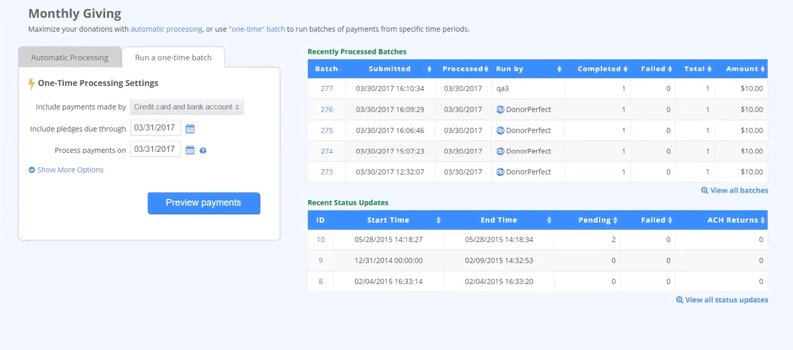
DonorPerfect is a CRM for nonprofits that manages donor data and tracks fundraisers. It stores detailed supporter records, including contact information, giving history, pledges, and campaign activity, and allows teams to customize fields and reports to fit their organization’s structure.
Beyond storing donor information, DonorPerfect lets you create donation forms, run fundraising events and auctions, and accept payments within the same platform. All of this activity feeds directly into the CRM, giving you a more complete view of each donor’s history and engagement patterns over time.
Key features of DonorPerfect
- Customizable donor records: Tailor supporter profiles with custom fields to track the information most important to your organization, such as program interests, board relationships, or event participation.
- Flexible reporting tools: DonorPerfect allows you to generate real-time reports on campaigns, gifts, donor segments, and events using powerful filtering and export options.
- Pledge and recurring gift management: The system tracks pledges, installment schedules, and recurring donations, helping you manage long-term commitments and follow up when payments are due.
- Segmentation and targeted outreach: You can create filtered lists based on giving behavior, campaign participation, or engagement history. This supports more focused fundraising appeals and donor communication.
- Integration options: DonorPerfect connects with email marketing tools, accounting software, and online donation platforms, which allows data to flow between systems while keeping donor records centralized.
Pricing
DonorPerfect’s pricing is not publicly available.
4. Little Green Light
Little Green Light is a cloud-based donor management platform built for small to mid-size nonprofits that need solid CRM functionality without the complexity or cost of enterprise-level software. It centralizes constituent records so teams can stay organized and build stronger relationships with supporters over time.
It's designed to integrate with third-party tools for email marketing, online donations, and accounting, making it a flexible hub for nonprofits that rely on a mix of platforms.
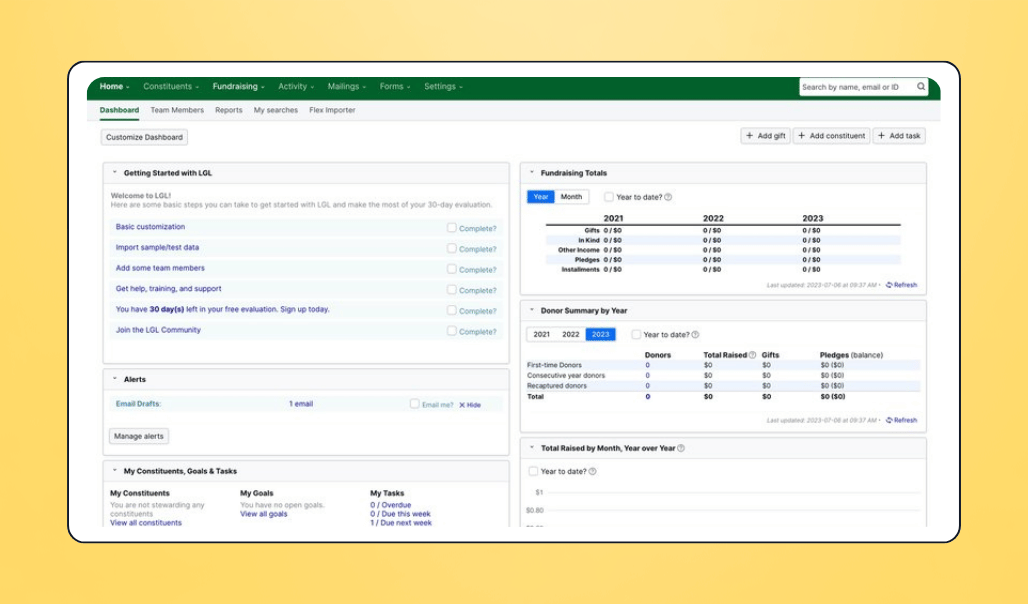
Key features of Little Green Light
- Customizable dashboard: Tailor your home screen to surface the metrics and tasks most relevant to your team, from recent gifts to upcoming deadlines and donor anniversaries.
- Contact & relationship management: Store detailed constituent profiles—including household relationships, giving history, and communication records—and segment your database to support more targeted outreach.
- Built-in & custom reporting: Generate reports on campaigns, gift trends, donor retention, and more using flexible filtering options. Custom reports can be saved and reused to streamline regular board or staff updates.
- Gift & pledge tracking: Log one-time gifts, recurring donations, pledges, and in-kind contributions, with tools to manage installment schedules and send automated acknowledgments.
- Volunteer management: Track volunteer hours, assignments, and history alongside donor records, giving you a fuller view of how supporters are engaged with your organization.
- Integration options: Little Green Light connects with email marketing platforms, online giving tools, and accounting software, allowing data to flow between systems while keeping constituent records centralized. It even integrates with Givebutter so you can use the tools together.
Pricing
Little Green Light uses a tiered subscription model based on the number of constituent records in your database, starting at around $45/month for up to 2,500 contacts and scaling incrementally as your database grows.
What to look for if you’re switching nonprofit CRMs
If you’ve realized that your current CRM isn’t giving you what you need to manage donors, fundraising, and communication smoothly, and you’re thinking of switching tools, here’s what to look for:
Ease of use for non-technical teams
Your CRM should feel intuitive from day one. Staff should be able to update records, segment donors, and run basic reports without needing weeks of technical training.
If the tool you’re evaluating offers a free plan or trial, use that time to explore the interface carefully. If simple tasks feel confusing or you keep relying on documentation to move forward, your team will likely struggle with adoption too.
Built-in connection to fundraising and communications
Many nonprofit CRMs (e.g., Givebutter) also provide donation forms, fundraising pages, and built-in email tools to help you keep in touch with your donors/supporters. Choosing a CRM that offers these features natively means you don’t have to use spreadsheets or external tools to manage operations.
However, if you already use a separate fundraising platform and email marketing tool, choose a nonprofit CRM that integrates smoothly with these platforms so data flows directly into the system without manual imports.
Clean data without heavy customization
A good nonprofit CRM should work well without requiring layers of custom fields, complex rules, or constant configuration changes. While some flexibility is helpful, you shouldn’t have to redesign the system just to reflect basic nonprofit workflows.
Look for a platform that handles common needs such as recurring gifts, campaign tracking, and household records by default. It should also reduce duplicate contacts automatically and keep donation records synced without manual cleanup sessions.
The less effort you spend maintaining the system, the more time you can spend building relationships.
Reporting that’s accessible, not intimidating
Reporting should help you answer practical questions quickly, such as how much you raised this quarter, which campaign performed best, or which donors have lapsed. You shouldn’t need to build complex queries or export raw data just to see your numbers.
In your evaluation, look for dashboards and filters that make information easy to find and understand. When reports are simple and visual, your team can use data regularly instead of only pulling it together for board meetings.
Scalability without enterprise-level complexity
As your nonprofit grows, your CRM should support more donors, more campaigns, and more communication without becoming harder to manage. Growth shouldn’t force you to install complicated add-ons or hire expensive consultants or a full-time CRM administrator.
The right system will scale with your fundraising activity while staying manageable for a small or mid-sized team.
Your nonprofit CRM system should work the way your nonprofit does
Your nonprofit CRM should support the way your team actually works, not force you to adjust your processes around it. It should make it easy to see donor information, track giving history, manage communication, and plan follow-ups without relying on spreadsheets or manual imports.
If you still struggle to get a clear view of your donors, connect fundraising with outreach, or fully trust the data in your system, it may be that the CRM simply was not built for nonprofit workflows. In that case, more training will not solve the problem, and it may be time to switch to a system designed specifically for nonprofits.
Givebutter is one such CRM. Its intuitive dashboards give you a complete view of each donor, while fundraising, event management, email outreach, and payment processing keep all activity connected in one place. That context helps you know when to follow up, which donors to prioritize, and how to re-engage supporters effectively.
If you’re ready to simplify your systems and get more from your donor data, you can sign up for Givebutter for free and explore how it works for your team.

As CEO of Civic Champs, I lead our team of passionate change leaders to create technology solutions to create a seamless and rewarding volunteering experience for both volunteers and service organizations.
.jpg)
.png)
.png)